Templates
Import a LaTeX design
Already have a résumé or cover letter you like, written in LaTeX? Upload its .tex file and HitApply turns it into a reusable template.
Before you start
- One
.texfile. If your design is split across several files, combine them into one first. - It should compile on its own, using standard LaTeX packages. Custom fonts or images that live outside the file won't come along.
- No Overleaf project? On Overleaf, open Menu → Download → Source and use the main
.texfile from the zip.
Import it
- Open Resume (or Cover Letter) in the sidebar.
- Press Add template.
- Under Import a LaTeX design, give it a name if you like, then press Choose a .tex file.
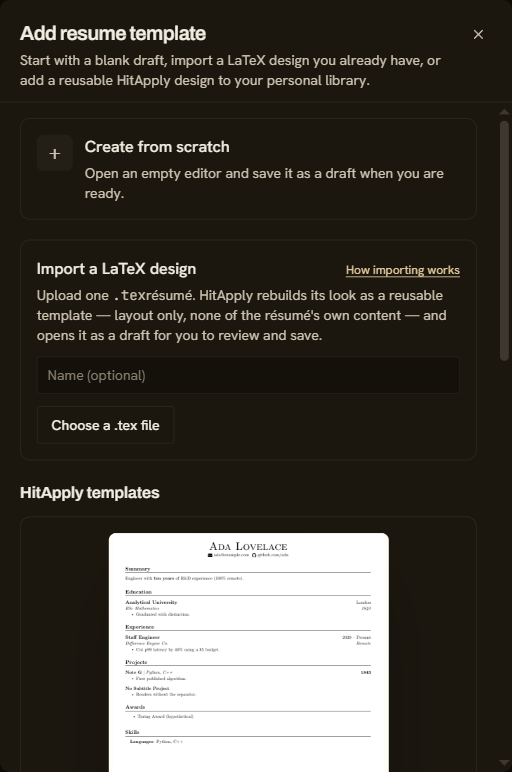
- Wait while HitApply converts it. This usually takes under a minute.
- The template opens in the editor as a Draft. Compare the preview with your original.
- Press Save. If it passes HitApply's checks, the Draft label goes away.
- Press Use template on its card to use it for new documents.
What happens to your file
- Résumés: HitApply keeps the look (fonts, spacing, section headings) and removes your actual content. Your profile supplies the content for every job.
- Cover letters: HitApply splits the file into a Design and a Letter. The letter is your text, with placeholders such as the company name, and you can edit it in the Letter view.
- A file that already follows the template reference is used exactly as it is, with no conversion.
Troubleshooting
| What you see | What to do |
|---|---|
| "OpenRouter is not configured" | Converting uses an AI model. Add your model key in Settings, then import again. Or upload a file that already follows the template reference, which needs no conversion. |
| Imported as a draft, with a reason | Open it in the editor. The reason says which part is missing or doesn't compile. Fix it and press Save. |
| The preview looks different from your original | Edit the LaTeX in the editor. Spacing and fonts belong to the template, so you can change them freely. |
| A section from your original is missing | Résumé templates use a fixed set of sections. See the template reference. |